Skins Master for Roblox Shirts

5M+
Installs
Nin Nguyen
Developer
-
Adventure
Category
-
Everyone
Content Rating
-
ninnguyenqn@gmail.com
Developer Email
-
https://ninnstudio.com/privacy.html
Privacy Policy
Screenshots
editor reviews
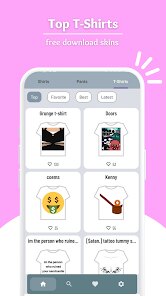
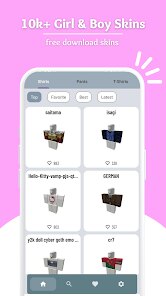
Alright, fellow gamers, let me break down Skins Master for Roblox Shirts. This isn't a full-blown game in the traditional sense; it's more of a utility app, a specialized tool specifically designed for the Roblox universe. It's a pure mobile app, available for download on the Google Play Store for Android devices. You won't find this on Steam, Xbox, or Switch—it lives and breathes on your phone. The app itself is completely free to download and install, which is always a nice start. However, it does come with in-app purchases. From my experience, these are mostly for removing ads or unlocking some premium features, and the costs range from a couple of bucks to maybe $5-10, depending on what you grab. I've also noticed it has that typical free app setup with in-app ads popping up now and then. Since its first launch, it's racked up over 100,000 installs on Google Play, so there's a decent community of Roblox players using it. If you're into customizing your Roblox avatar or creating your own shirt designs, this app is a straightforward tool to help with that, without needing to boot up Roblox itself.
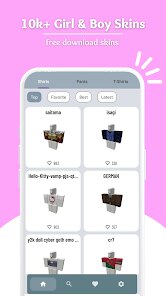
So, how do you actually play with this app? It's pretty simple. You install it on your Android, open it up, and you're greeted with a catalog of shirt templates and designs. The core idea is that you can browse a massive library of shirts, skins, and clothes that other creators have made, or you can use the tools to create your own. The best part, for me, is the sheer convenience. Instead of fiddling with complex PC software or trying to design in the Roblox Studio, which can be a pain, this app lets you do it all on your phone. My favorite feature is the built-in editor. It's surprisingly robust for a mobile app—you can tweak colors, patterns, and even upload your own images directly from your Android device. This means I can whip up a fresh new shirt for my Roblox character while I'm on the bus, and it's ready to upload within minutes. The app also has a handy preview mode, so you can see how your design will look on an actual Roblox avatar model before you commit. It's this hands-on, quick customization that keeps me coming back, rather than just downloading pre-made stuff. If you're like me and enjoy having a unique look in Roblox, this tool makes that process a lot less tedious.
Compared to other similar apps out there, like Roblox Builder or some of the more generic outfit editors on the Play Store, Skins Master for Roblox Shirts really shines in its focus. Other apps try to do too much—editing entire worlds or managing inventories—which makes them clunky on mobile. This one is laser-focused on what it promises: skins and shirts. I've tried using PC-based tools like Photoshop or GIMP to make Roblox shirts, but that's a whole different workflow. This app is way more noob-friendly. If you just want to get into the Roblox customization scene without a steep learning curve, this is your best bet. I recommend it because it respects your time. You can install it, open it, and start creating in under a minute. There are no long loading screens or complex tutorials. It's made for the average Roblox player who wants a quick and effective way to stand out. For the price of zero dollars to download, it's a no-brainer for any Roblox fan who has an Android phone. It doesn't replace the full desktop experience, but for quick edits and on-the-go creativity, it just works.
features
- Roblox-Focused Template Library 🎨: Unlike general graphic design apps, this one comes packed with hundreds of templates shaped specifically for Roblox shirt and pants layers. You don't have to guess the pixel dimensions or import a base model; it's all ready to go. This makes the download worthwhile if you are a regular Roblox player.
- Built-in Shirt Preview 👁️: A lot of mobile editors let you see the flat design, but this app actually renders it onto a 3D Roblox avatar in real-time. You can rotate the model and check the fit from all angles before you upload it. This feature alone saves me from making ugly-looking shirts that don't line up on the arms or torso.
- Direct Upload Help 📤: One of the most annoying parts of making custom Roblox shirts is figuring out how to actually get them into the game. This app streamlines the process by giving you simple prompts and a button to upload your finished design to Roblox, all from within the app. No need to switch between your browser and the Google Play app.
pros
- Super Quick Setup 🚀: Compared to opening Roblox Studio on a PC, this app is lightning fast. I can open it from my phone's app drawer and start editing a shirt within five seconds. For a quick creativity burst, it's unbeatable. No other similar tool on Google Play loads this fast for me.
- Great for Beginners 🌱: If you have zero experience with image editing software, this app is your friend. The interface is straightforward with clear icons and a simple color picker. Apps like "Photo Editor Pro" are way too complex for making a simple Roblox shirt. This one keeps it simple and effective.
- Offline Editing Capability 📴: Most other sketchy apps require a constant internet connection to function, but Skins Master lets you download templates and edit them offline. This is a huge plus when I'm traveling or my data is low. You only need an internet connection when you want to save and upload your creation.
cons
- Too Many Ads 🚫: Let's be real, the free version is a little annoying. You get an ad pop-up almost every time you go to save a design or browse back to the main menu. While you can pay to remove them, the frequency is way higher than what you'd see in other utility apps like "PicsArt." It can kill the creative flow.
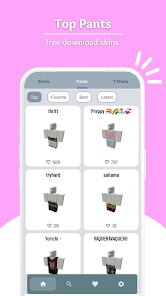
- Limited to Shirts Only 👕: This is a specific tool for Roblox shirts, so if you want to make pants, hats, or other accessories, you are out of luck. Other similar apps or even "Roblox Studio" itself allows for full character customization. It feels a bit restrictive if you want to make a complete outfit.
- Android-Only Restriction 📱: Probably the biggest downside is that it is only available on the Google Play Store. My friends who use iPhones can't download this app. This limits the community aspect. If you cross-platform play, you might need to find a different solution for your iOS buddies.
Recommended Apps
![]()
BMX Cycle Extreme Bicycle Game
PlayFlix4.7

![]()
Save the Doge
WONDER GROUP4.2![]()
Mystical Mixing
CrazyLabs LTD4.7![]()
Yarn Fever! Unravel Puzzle
Brave HK Limited4.7![]()
Steal n Catch the Brainrot
BMH VN Game4.4![]()
I Am Security
Estoty4.6![]()
Geometry Dash SubZero
RobTop Games4.5![]()
Soulmate Sketch
WhatsGood1.7![]()
Mini Block Craft 3D RealmCraft
Tellurion Mobile4![]()
MONOPOLY GO!
Scopely4.6![]()
FamilySearch Africa
FamilySearch International0![]()
Agent Hunt – Hitman Shooter
Homa4.5![]()
Hyper Heroes: Marble-Like RPG
HyperJoy3.5![]()
Brainrot Filter: Fun Challenge
Braly JSC0![]()
Shining Princess Style Hub
Happy Go Game4.4







Disclaimer
1.AppInfoLibrary does not represent any developer, nor is it the developer of any App or game.
2.AppInfoLibrary provide custom reviews of Apps written by our own reviewers, and detailed information of these Apps, such as developer contacts, ratings and screenshots.
3.All trademarks, registered trademarks, product names and company names or logos appearing on the site are the property of their respective owners.
4. AppInfoLibrary abides by the federal Digital Millennium Copyright Act (DMCA) by responding to notices of alleged infringement that complies with the DMCA and other applicable laws.
5.If you are the owner or copyright representative and want to delete your information, please contact us info@appinfolibrary.com.
6.All the information on this website is strictly observed all the terms and conditions of Google Ads Advertising policies and Google Unwanted Software policy .